For people who run projects and already work with an AI assistant
Your project status,
written while you work.
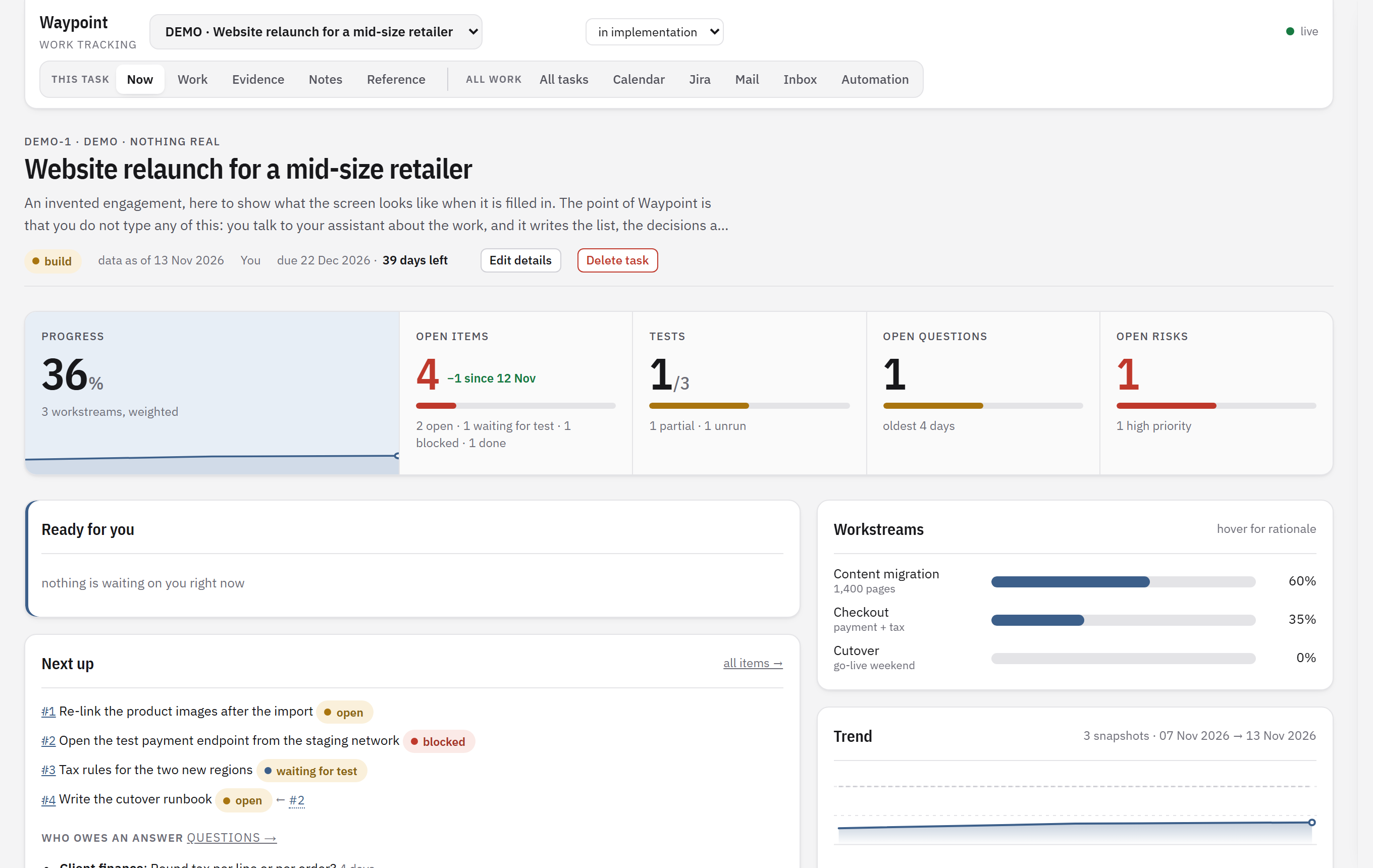
Waypoint is a desktop app that keeps the state of your work on one screen: what is open, who owes you an answer, what could go wrong and how far along you are. You do not fill it in. Your own Claude or Codex does, from the conversations you are already having.
How it works
Three steps, and the second one is talking.
Install and connect
Run the installer. Waypoint checks that Claude Code or Codex is on your machine and signed in, then introduces itself to your assistant with one click.
Say it once
In any project, tell your assistant to track the work. It reads what you have discussed and writes the items, open questions, risks and decisions.
Open the screen
Every morning one page tells you what is next, what is blocked and who has not answered. As the work moves, the assistant keeps the record current.
One screen per piece of work
Everything a status meeting asks for.
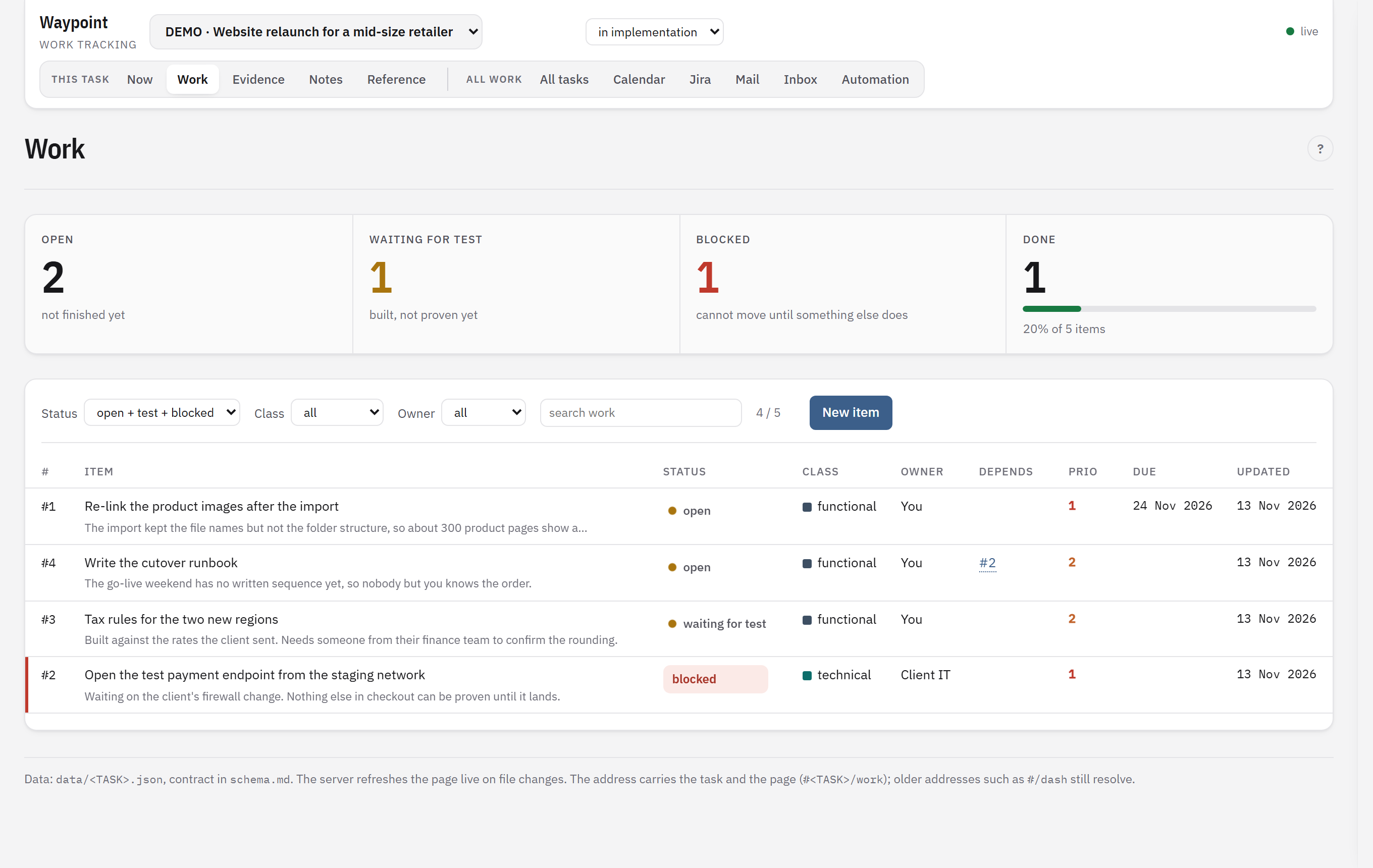
- Open items and what blocks themEach item has a status, an owner and the item it waits on.
- Questions and who owes the answerWith the number of days it has been open, and a follow-up mail draft when you want one.
- Risks, decisions and evidenceWhy something was decided and what proves a thing works, kept next to the work.
- Progress you can defendWeighted by workstream, with a trend line from dated snapshots.
Automation
It watches Jira and your mail. You approve what it finds.
Background jobs read your tickets and your mailbox and work out what changed for each piece of work. Nothing is written on its own: every finding lands in an inbox as a suggestion you accept or reject.
Jira
New tickets on your list, changed due dates and status, new comments. Each becomes a suggestion for the task it belongs to. You choose which tickets with your own JQL.
Outlook mail
An answer to an open question is matched to that question. Mail threads that belong to a task are kept beside it, and reply drafts are written when you ask.
Weekly review
Once a week each open task is read as a whole: stale items, questions nobody answered, dates that no longer hold. Every change can be undone with one click.
Your data
It stays on your machine.
Plain files, one per task
Your tasks live in a folder in your user directory. Copy the folder and you have a backup. There is no Waypoint cloud holding your work.
Your own AI plan
Waypoint does not resell AI. It runs the Claude Code or Codex you already use, signed in with your own plan, and warns you if an API key would bill per use.
No usage tracking
The app sends no analytics. It contacts Jira and your mail only when you connect them, and the download page to check for a new version.
Questions
Before you download.
What do I need?
Windows 10 or 11, and Claude Code or OpenAI Codex installed and signed in with a paid plan. Jira and Microsoft 365 are optional; without them Waypoint still tracks whatever you and your assistant put in.
Do I have to use Jira?
No. A task can start from a conversation with your assistant, from a Jira ticket or by hand. Jira adds the ticket list and the jobs that watch it.
Windows warns me about the installer. Why?
The installer is not code-signed yet, so Windows shows an "unknown publisher" notice on the first install: choose More info, then Run anyway. Updates after that are downloaded by the app itself and checked against a signature before they are offered.
What does it cost?
Nothing during the beta. Pricing will be announced before the beta ends; the AI usage is always on your own Claude or ChatGPT plan.
Is there a Mac version?
Not yet. Windows comes first.
Can I look before I connect anything?
Yes. On first start choose Show me an example: a filled-in invented project opens so you can see every page. Delete it when you are done.